For years I've relied on Dash to provide offline documentation for coding projects. Unfortunately, the excellent Dash app is not available cross-platform which means I've started using Zeal for offline access to coding documentation.
Add Docs to Zeal
To add documentation to Zeal click the button provided when you open the application. Then search through the available Docsets built into the application. Once you found one you want, click on it and then click download.
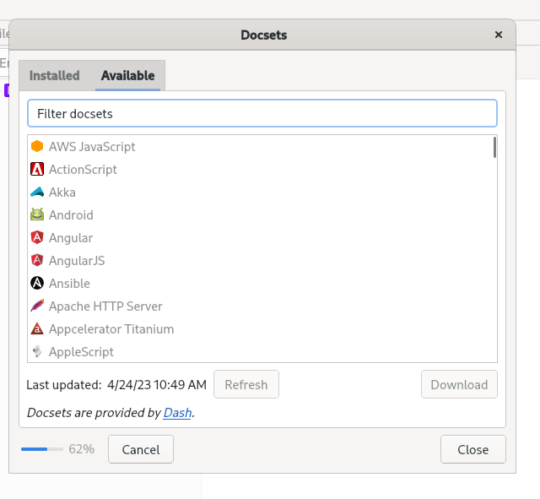 Adding docsets in Zeal
Once Zeal downloads the Docset you can close the settings and you'll have your documentation available offline.
Finding Documentation in Zeal
To search documentation start typing the function you're looking for in the top left corner of the application.
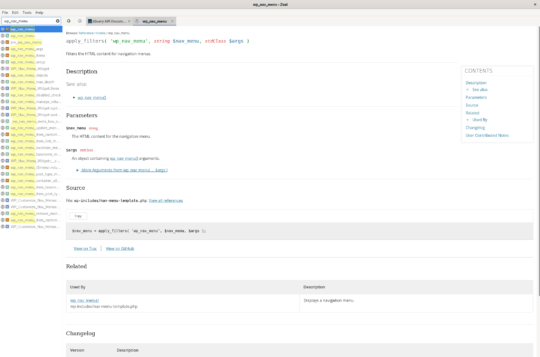 Zeal search
You can use your arrows keys to navigate down to the specific function you'd like to look at and then press Enter to have the full details of the function shown in the main window.
You can also have multiple documentation examples open in Zeal at the same time by using the tabs the application provides. Press CTRL + t or CMD + t to open a new tab and then you can start searching for another bit of code you want to reference.
I'll Still Have to Use Dash
The only bad thing about Zeal is that it's not available on macOS, they recommend you use Dash. Yes Dash has been great for me, but I'd really prefer to use one app and learn all it's little nuances than be split across two different tools based on the platform I'm using.